How to Claim and Verify Your Business on ChatGPT (2026)
OpenAI has launched Businesses in ChatGPT beta, and eligible owners may now claim an existing business listing in Business Hub. Verify your connection to the business, wait for claim approval, then complete Persona identity verification to publish updates and access available insights. Here is the current process and its limits.
Quick answer
- Sign in to Business Hub
- Find your listing
- Verify with phone, email, DNS or Shopify
- Wait for OpenAI's decision
- Complete Persona ID check
- Edit details and check Insights
Check eligibility before you start
OpenAI released Businesses in ChatGPT beta on November 10, 2026. You must own the business or be authorized to represent it. Availability depends on business type, location and supported verification.
The important local limitation: stores and restaurants can currently claim only an existing U.S. listing. Eligible online businesses may see an Add business option where ChatGPT is available and verification is supported. A missing restaurant listing is not a reason to create a different or inaccurate business profile. Neither an Ads account nor a ChatGPT Enterprise agreement is required.
Sign in to Business Hub
Visit chatgpt.com/business-hub and sign in to your managing account, or open Business Hub from the sidebar. For a claim invitation, use its personal link and the recipient email. Do not forward it to an agency.
Find the correct existing listing
Search by business name, select the correct listing and location, and confirm your account. Claiming a main brand does not claim its locations. Central management across a parent company’s brands and locations is not currently available.
If the listing shows Contact support, it is locked; use that option for access help rather than trying to work around the lock. If someone has already claimed it, open the profile’s more options menu and select Dispute ownership. Follow the offered Persona process to show you are authorized. Claiming or disputing ownership does not change the listing’s visibility in ChatGPT.
Use a verification method offered for your business
The available pathways may include business phone, business email, website domain or Shopify. For phone verification, request an SMS or automated call to the number shown and enter the code. For business email, request the code sent to the associated address. These options are listing-specific: do not assume you can substitute any number or email.
For domain verification, copy the TXT record’s type, host or name and value exactly into your domain’s DNS settings. Ask your domain manager to add it if you lack access. DNS changes may take time to appear; return to Business Hub and select Verify domain. For Shopify, review the requested permissions, sign in to the matching store and follow the prompts. Owners should keep credentials and codes private.
Need help with DNS verification or setup? See our ChatGPT business listing setup and verification assistance. We can check the available route and help prepare the record without taking over your identity checks.
Wait for OpenAI’s claim decision
OpenAI emails its decision or a request for more information. You can cancel a pending claim. A phone code or DNS record does not guarantee approval. There is no fixed timeline; an agency cannot secure approval or bypass requirements.
Complete Persona identity verification
After claim approval, complete Persona verification before publishing changes, viewing insights, connecting a product feed or creating an eligible agent. Open the business overview, choose Verify with Persona and follow the instructions. Persona may require a government-issued ID, registration information and proof that you are authorized to represent the business. Submit sensitive documents directly to Persona.
OpenAI reviews that submission separately and emails its decision or a request for more information. Submitting documents does not itself mean approval. Claiming alone does not give a blue verified badge; approved Persona verification does. If you use Persona to create a new profile, OpenAI’s approval automatically publishes the profile, so proceed only when ready. Publishing an agent remains a separate step.
What we saw when we claimed Single Stop Marketing's listing
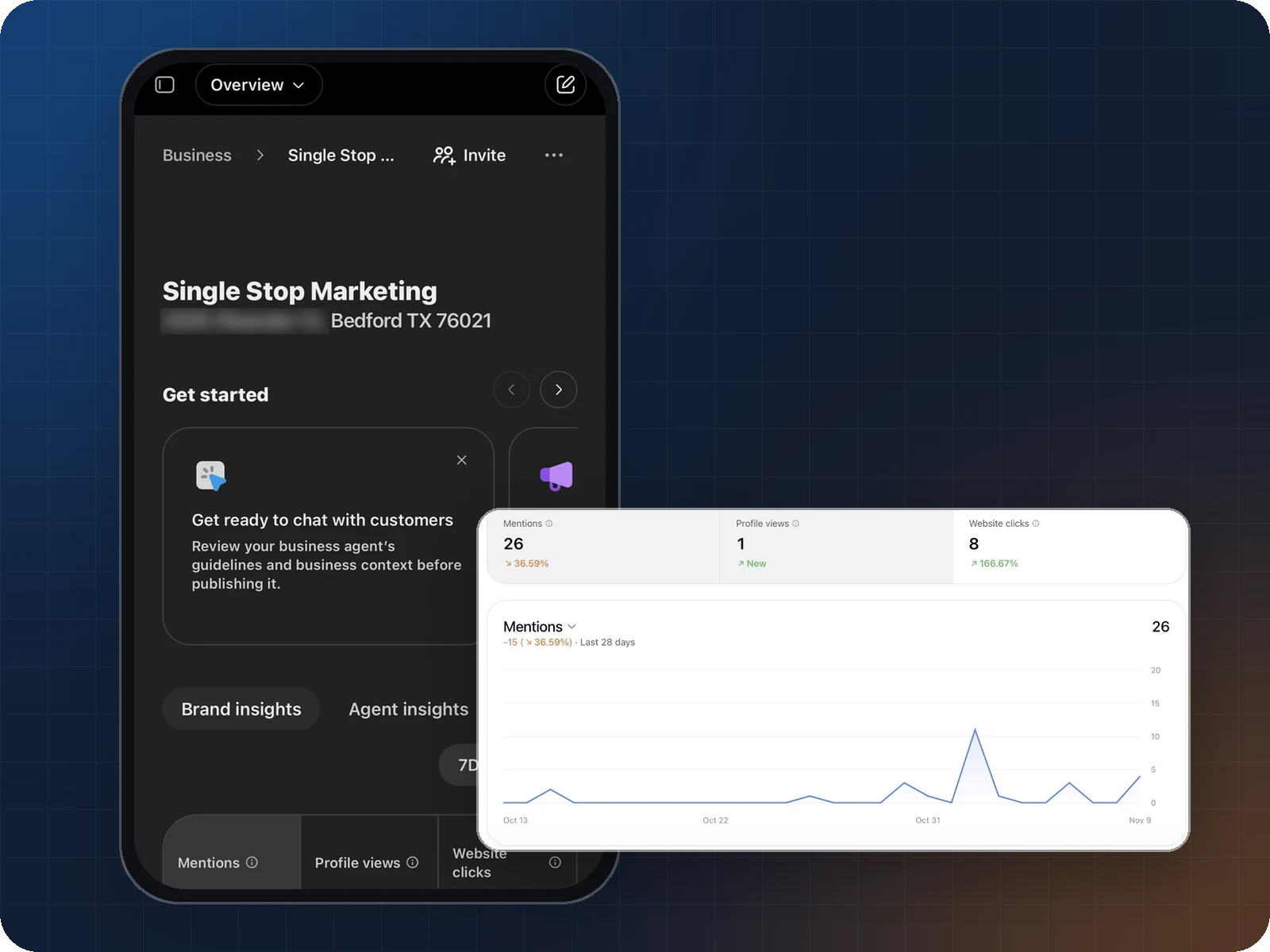
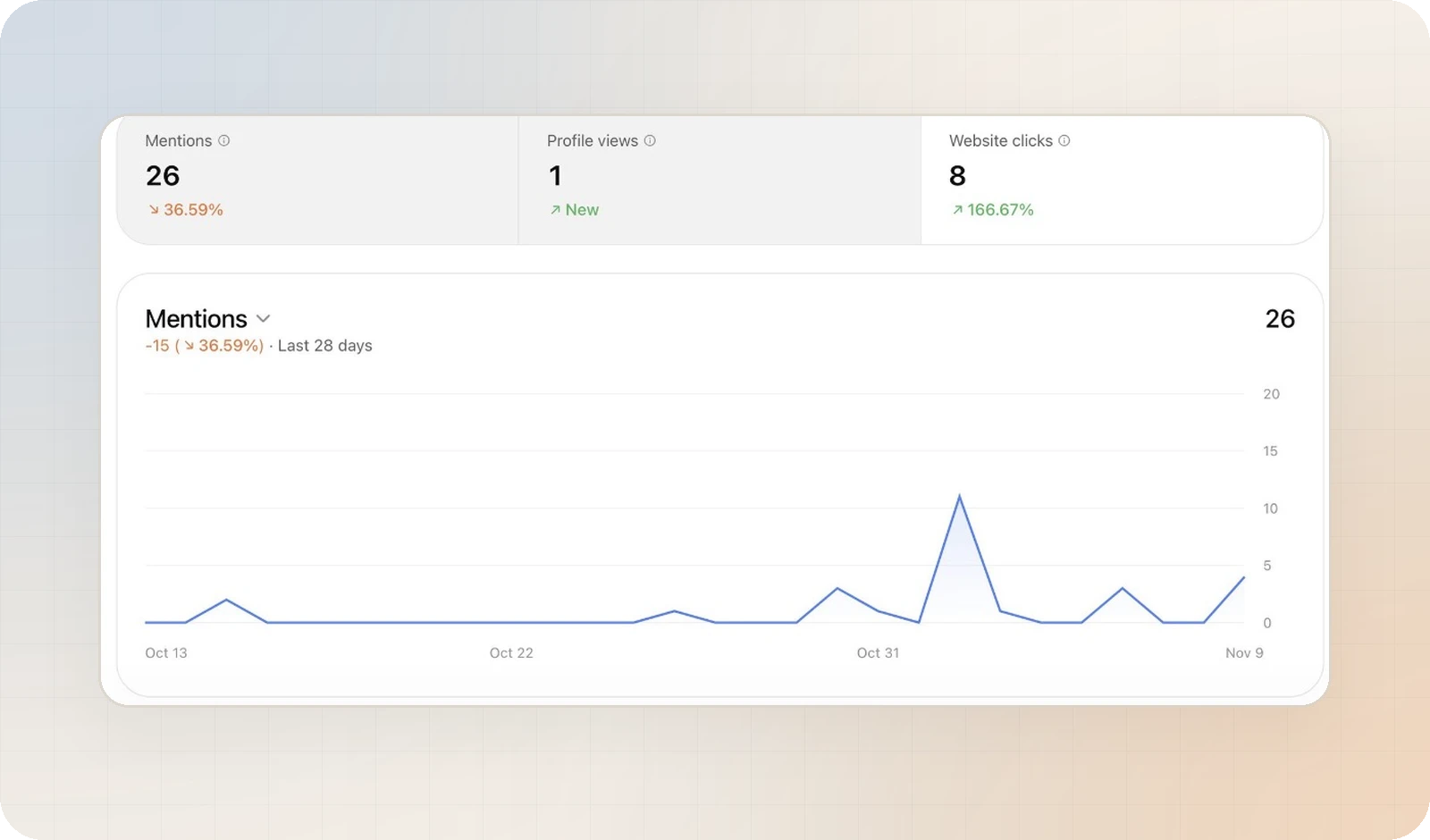
We claimed and verified our own listing on November 10, 2026, launch day. On approval, Insights already showed October 13–November 9: 26 mentions, 1 profile view and 8 website clicks. ChatGPT had been mentioning us before we claimed anything. Your numbers will differ.
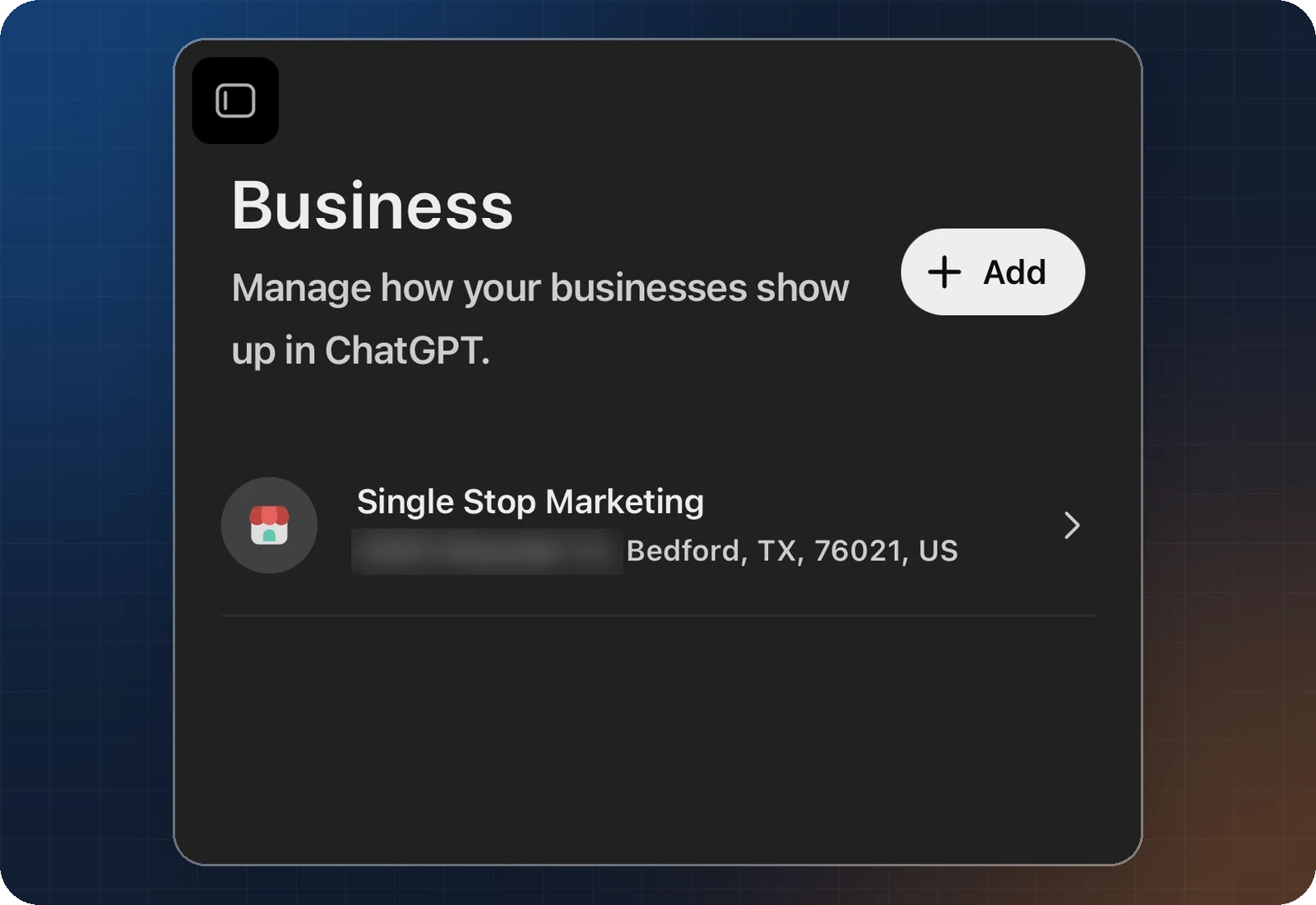
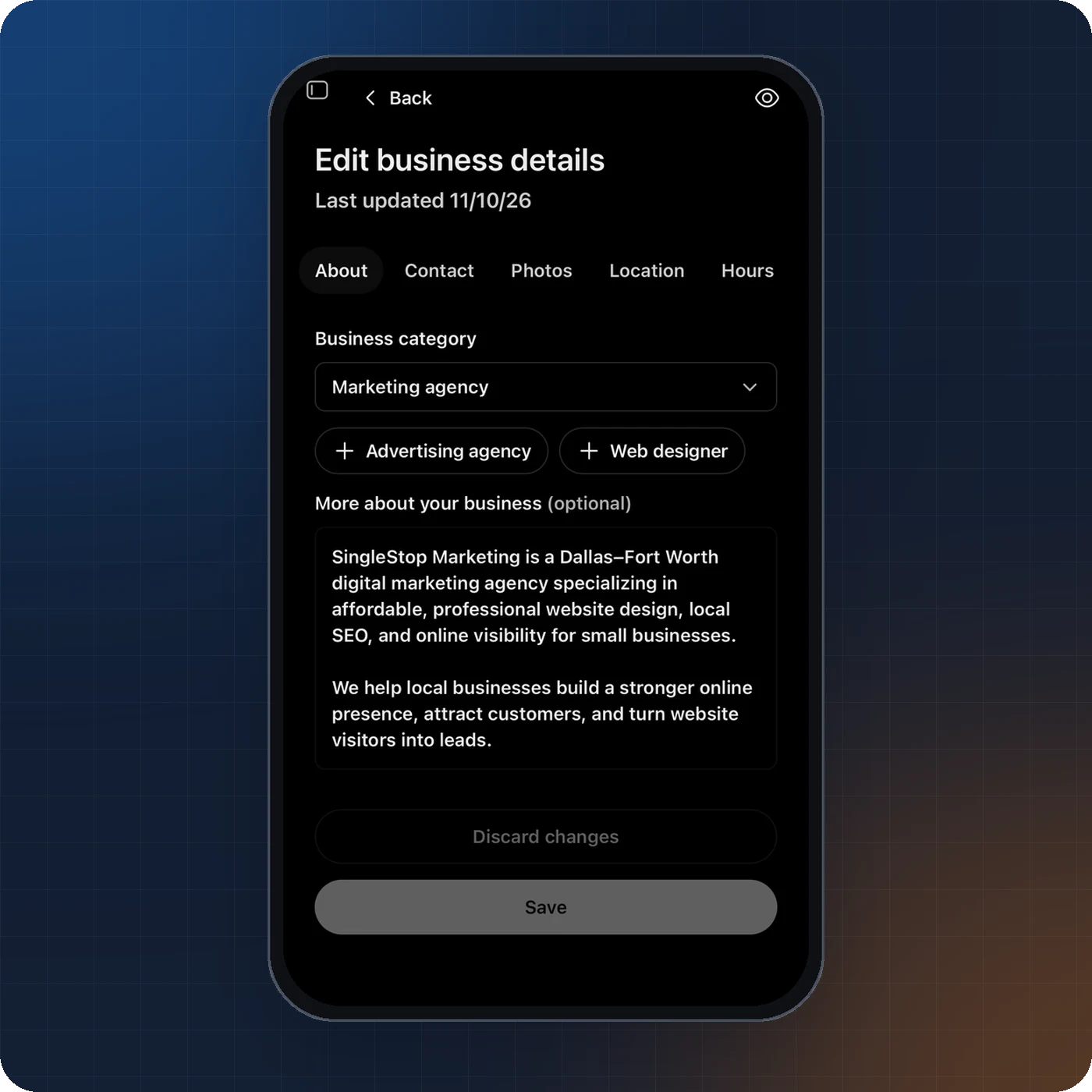
The Business list has an Add button, and the overview has an Invite button for teammates or an agency. Edit business details has About, Contact, Photos, Location and Hours tabs. About includes a primary category, suggested extra categories and an optional description.
Edit accurate details and submit for review
Once your claim and Persona verification are approved, open Edit business details. We saw five tabs: About, Contact, Photos, Location and Hours. About has a primary business category, suggested extra categories and an optional More about your business description. Use current facts and only materials you are authorized to submit. Do not invent a policy to fill a field.
OpenAI reviews and publishes changes, and updates may take time to appear. ChatGPT may still use other sources: claiming does not give exclusive control over the contents of a listing or every answer about your business. Review the Businesses in ChatGPT terms before submitting public information.
The claiming admin can use the Invite button in Business Hub to add teammates or an agency. Each person uses their own ChatGPT account. Never share logins.
Read the available insights
After both approvals, open Insights to review mentions, profile views and website clicks with the 7D / 28D toggle. Brand insights and Agent insights are separate tabs. We saw 26 mentions, 1 profile view and 8 website clicks for October 13–November 9, 2026, visible on our November 10 claim day. For an online business, a mention counts when ChatGPT references its website; the brand name alone does not count. For a local business, it counts when ChatGPT shows a result for that location, even without a listing or website click.
Discovery topics group themes in answers mentioning or citing the business, not individual prompts or direct customer intent. You do not receive consumer conversations or Business Agent chats. Counts may be incomplete. A blank metric can mean a reporting threshold is unmet, collection is ongoing or reporting is unavailable, rather than zero activity. These figures do not guarantee leads, sales or higher recommendation placement.
Keep Business Agents separate from claiming
Business Agents are initially a separate option for eligible U.S. ecommerce and online-service businesses with websites, subject to industry rules and approved verification. A profile can be eligible for management without being eligible for an agent. If the agent option is available, review its information, test customer questions and publish it only when ready.
An agent can explain products and policies and link to your website, but cannot currently complete purchases, make bookings or check orders. Its labeled conversation is separate from ChatGPT’s independent answers. Agent setup is not required to claim a local listing.
Claimed business listing vs Business Agent vs Google Business Profile
| Tool | Purpose | Access | Limits |
|---|---|---|---|
| Claimed business listing | PurposeManage submitted ChatGPT business details and eligible aggregate insights | AccessEligible business, supported claim method and approved Persona verification | LimitsDoes not control independent recommendations or guarantee more visibility |
| Business Agent | PurposeA separate, labeled customer chat using business-provided information | AccessInitially eligible U.S. ecommerce and online-service businesses, plus verification and industry requirements | LimitsNo payments, bookings or order checks; optional separate publication |
| Google Business Profile | PurposeManage a business’s information on Google Search and Maps | AccessGoogle’s own eligibility and verification process | LimitsSeparate platform; not a substitute for Business Hub or a promised rank boost |
Understand OpenAI’s terms before you submit
OpenAI’s Businesses in ChatGPT Terms, last updated November 18, 2026, supplement your applicable OpenAI agreement. Enabling, accessing or using the service, or providing data or materials through it, means agreeing to these terms. The person acting for the business must have authority to bind it.
You remain responsible for people acting on your behalf, including an agency. Use only information and images you have the right to provide. Do not use the service unlawfully, infringe third-party rights, extract data or circumvent its protective measures. Do not buy, sell, transfer or share credentials or access mechanisms except as OpenAI permits. Use the supported Invite option rather than sharing your password.
Individual tools have additional provisions when you enable, leave enabled or elect to use them. OpenAI may develop, configure and test tools, including Business Agents, before you choose to use them, using data as permitted under its terms or your agreement. Review the full terms and the provisions for any tool you enable; claiming a listing and publishing an agent are separate decisions.
This is a practical summary, not legal advice or a replacement for OpenAI’s agreement. SingleStop cannot change OpenAI’s terms, approve your business or promise how ChatGPT will describe it. Read the current terms yourself before submitting business information, and keep identity documents and verification codes within OpenAI’s or Persona’s direct process.
Current facts first. Recommendations remain independent.
SingleStop’s 2026 DFW ChatGPT Local Search Visibility Study observed recommendations and citations before this release. That research is distinct from OpenAI’s official claiming process and cannot show that claiming a listing improves ranking or visibility. Use it as supplemental context, not an approval or performance guarantee.
This guide was published November 11, 2026, following OpenAI’s November 10 launch. Beta availability and requirements may change. Check the current official guidance before submitting information. SingleStop Marketing is an independent service, not affiliated with or endorsed by OpenAI.
Frequently asked questions
Yes. Claiming is free and self-serve. An agency’s setup assistance is optional. Our first 10 eligible DFW spots are free through November 30, 2026, or until filled; setup is included in Scale and otherwise quoted.
Need help with DNS verification or setup?
Get an eligibility and setup review from SingleStop. You keep control of your account and complete Persona directly. Never send us IDs, passwords or verification codes.
Get help claiming and verifying your ChatGPT business listingContinue reading

How AI Search Will Impact Local Businesses During FIFA 2026
FIFA 2026 will be the first AI-search World Cup. The full citation-engineering playbook for DFW small businesses — schema, multilingual content, AI Overviews, ChatGPT Search, and Perplexity.
Read article
AI + Local SEO: How Small Businesses Win Their Zip Code in 2026
The 2026 playbook for combining AI automation with local SEO — GBP, reviews, hyper-local content, and AI search visibility that put small businesses on top of the map.
Read article